


Description
Mirbal – NodeJS Admin Dashboard Template
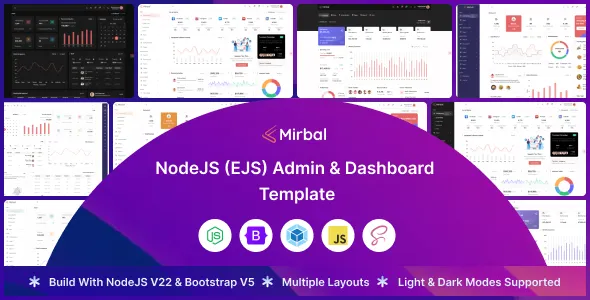
Mirbal – NodeJS Admin Dashboard Template is a modern, powerful, and performance-optimized admin dashboard solution built specifically for developers, startups, and enterprises that require an advanced, responsive, and easy-to-customize backend interface. Designed with cutting-edge web technologies and a clean, modular architecture, Mirbal provides the perfect foundation for building scalable admin panels, SaaS platforms, analytics dashboards, project management systems, and business applications.
Overview
Mirbal is a professionally designed NodeJS admin dashboard template that combines sleek visual aesthetics with technical excellence. It is structured using NodeJS and Express, ensuring smooth performance and seamless data handling. The front-end is crafted using Bootstrap 5, HTML5, CSS3, and JavaScript ES6+, offering a highly responsive and interactive user experience across all devices.
The template includes a rich variety of pre-built components, widgets, and UI elements that streamline the process of creating complex dashboards with minimal effort. Developers can integrate APIs, manage data visualization, and create real-time analytics easily thanks to its well-organized code and modular design system. Whether you’re building an internal tool, SaaS analytics dashboard, or client-side admin panel, Mirbal offers the flexibility, scalability, and power to bring your project to life.
Benefits of Using Mirbal
Using Mirbal enables developers and businesses to save countless hours in development time while maintaining professional-grade performance and appearance. The template’s modular codebase allows for easy scalability — perfect for startups that expect their applications to grow over time.
Its responsive design ensures that every chart, widget, and form adapts seamlessly across devices, providing a smooth user experience whether accessed on desktops, tablets, or smartphones. With pre-designed dashboards for analytics, eCommerce, sales, project management, and more, you can jumpstart your project without starting from scratch.
Another key advantage of Mirbal is its robust architecture built on NodeJS, which supports asynchronous programming for faster data handling and reduced latency. Combined with the power of Express and RESTful API integration, Mirbal ensures top-tier backend efficiency and front-end performance.
Why Choose Mirbal
Choosing Mirbal means choosing a template that’s engineered for flexibility, scalability, and long-term reliability. Unlike many dashboard templates that only focus on front-end visuals, Mirbal offers a complete NodeJS-powered ecosystem that streamlines server-side management and client-side rendering.
Developers appreciate its well-structured code, detailed documentation, and the ability to integrate with any modern JavaScript framework like React, Angular, or Vue for extended functionality. Businesses value its professional design and robust data visualization tools that simplify reporting and analytics.
With Mirbal, you’re not just getting a dashboard template — you’re investing in a fully functional development framework that accelerates your workflow and helps your team build applications faster and smarter.
Feature Highlights
-
NodeJS + Express Backend Integration: Powerful server-side framework for rapid API development.
-
Modular Code Architecture: Organized, scalable structure for easy maintenance and customization.
-
Bootstrap 5 Framework: Sleek, modern design built on a responsive front-end framework.
-
Dark & Light Mode: Seamless toggle for modern user preference.
-
Advanced Charts & Graphs: Integration with Chart.js, ApexCharts, and D3.js for data visualization.
-
Pre-Built Dashboard Variations: Includes Analytics, eCommerce, CRM, Finance, and Sales dashboards.
-
Authentication & Authorization: Ready-to-use login, register, and role-based access templates.
-
Reusable Components: UI widgets, buttons, forms, tables, modals, and alerts.
-
Data Tables & Filtering: Dynamic tables with sorting, search, and pagination.
-
Notifications System: Integrated alert and notification modules for real-time updates.
-
Cross-Browser Compatibility: Works across Chrome, Firefox, Safari, and Edge.
-
Comprehensive Documentation: Developer-friendly guides and examples.
Performance Optimization
Mirbal is optimized for top-tier performance from the ground up. The template leverages NodeJS’s event-driven, non-blocking I/O model to ensure rapid data processing and seamless real-time communication between the server and client.
The use of modern build tools and code minification reduces page load times significantly. The asset pipeline is optimized for compression, lazy loading, and caching, ensuring minimal bandwidth usage and faster rendering.
Moreover, the dashboard’s UI components are designed for efficiency, with asynchronous data fetching and chart updates that prevent unnecessary re-renders. This means faster response times and a more fluid user experience, even under heavy data loads.
Marketing Advantage
In the competitive world of SaaS and digital applications, Mirbal provides a professional edge that instantly elevates your platform’s visual and technical credibility. Its modern, minimalist UI design projects professionalism, trust, and clarity — vital traits when attracting users, clients, or investors.
The analytics-focused layout and data presentation make it ideal for startups and enterprises that rely on dashboard-driven insights. Developers and agencies can also use Mirbal to rapidly prototype new SaaS applications or offer custom solutions to clients with reduced turnaround times.
By integrating Mirbal into your workflow, you strengthen your brand’s technological identity and deliver a superior user experience that drives engagement and retention.
Who Should Use Mirbal
Mirbal is perfect for:
-
Developers building admin dashboards, SaaS platforms, or web applications.
-
Startups developing analytics or project management tools.
-
Enterprises needing custom internal dashboards for monitoring and operations.
-
Agencies building client dashboards or data visualization panels.
-
Educational or research organizations tracking datasets and metrics.
-
IT firms offering digital transformation and automation services.
The flexible structure of Mirbal ensures it adapts seamlessly to diverse industries — whether it’s finance, logistics, retail, healthcare, or technology.
Customization and Scalability
Mirbal’s customization capabilities make it an ideal foundation for both small and large-scale projects. Every UI component is modular, meaning you can easily add, remove, or rearrange sections based on project requirements.
Developers can modify the color scheme, typography, and layout structure using well-commented SCSS files. Built on Bootstrap 5, Mirbal provides easy theming and compatibility with existing front-end frameworks.
Its API-ready backend allows you to connect it effortlessly with databases such as MongoDB, MySQL, or PostgreSQL. The integration with RESTful APIs ensures smooth communication between the client and server.
As your application grows, Mirbal’s scalable architecture supports adding new features and modules without affecting existing functionalities — a crucial advantage for long-term projects.
User Experience and Interface Design
Mirbal emphasizes usability through clean typography, intuitive navigation, and responsive design. The side navigation bar and top menu provide easy access to major sections, while dynamic breadcrumbs and collapsible panels help users navigate complex datasets effortlessly.
Interactive elements like tooltips, modals, and notifications enhance engagement while maintaining a professional visual tone. The template also includes several pre-designed dashboard layouts that can be tailored to different industries — from analytics and eCommerce to CRM and finance.
Each chart, form, and widget has been carefully designed to ensure clarity and readability, enabling users to extract insights at a glance.
Developer Experience
From a developer’s perspective, Mirbal is a delight to work with. It follows clean coding standards, uses ES6+ syntax, and integrates NodeJS’s best practices for modularity and reusability. The documentation covers installation, customization, and deployment steps, making it easy even for intermediate developers to get started quickly.
Mirbal also supports integration with task runners like Gulp or Webpack for efficient asset management and build processes. The directory structure is intuitive, promoting easy navigation through modules, components, and assets.
Conclusion
Mirbal – NodeJS Admin Dashboard Template redefines what an admin dashboard should be — not just visually appealing but technically powerful, flexible, and built for performance. It’s more than a static template; it’s a full-fledged framework for creating dynamic, data-driven applications.
With its responsive design, powerful NodeJS backend, and comprehensive set of UI components, Mirbal enables teams to build professional dashboards quickly and efficiently. Whether you’re managing data analytics, customer insights, or internal operations, Mirbal empowers your team to turn complex information into actionable insights with style and precision.
Key Features
-
NodeJS + Express backend integration
-
Bootstrap 5 responsive design
-
Modular and scalable architecture
-
Multiple dashboard variations
-
Chart.js, ApexCharts, D3.js integration
-
Authentication pages (login/register)
-
Data tables with sorting and pagination
-
Notifications and alerts module
-
SCSS-based theming system
-
Clean and commented code
-
RESTful API ready
-
Developer-friendly documentation
-
Cross-browser and device compatibility
-
Optimized for performance and speed
-
Built for scalability and long-term use



There are no reviews yet.