


Description
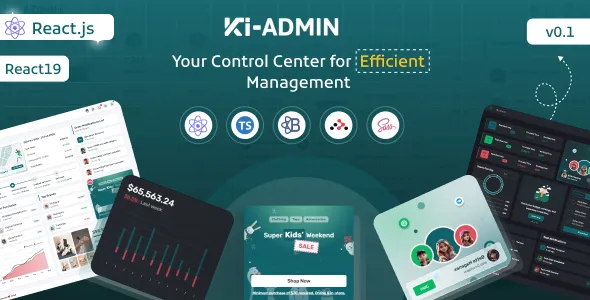
Ki-admin — React + TypeScript Admin Dashboard Template is a modern, enterprise-ready admin UI kit and starter application built with performance, developer experience, and scalability at its core. Crafted for product teams, SaaS founders, and engineering organizations that need a polished administrative interface without rebuilding the basics, Ki-admin combines a thoughtfully designed component system, TypeScript-first architecture, robust state management patterns, accessibility-conscious styling, and best-in-class developer tooling. Whether you’re building a B2B SaaS analytics panel, internal ops platform, e-commerce admin, or a multi-tenant management console, Ki-admin accelerates delivery by providing a production-minded foundation: reusable UI components, layout primitives, data visualization widgets, authentication flows, role-based routes, forms and validation, and integrated examples for real-world workflows.
The template embraces modern React paradigms — functional components, React Hooks, Context API (or optional Redux Toolkit integration), and TypeScript typings everywhere — so developers can move quickly with strong type-safety and maintainable code. It ships with a flexible layout system (responsive sidebar, top navigation, multi-column content areas), a design token system for theming (light/dark and brandable variables), and a modular folder structure that supports incremental adoption. Ki-admin isn’t opinionated about your backend stack: it provides example API adapters and mock server configurations so you can swap in REST, GraphQL, or WebSocket data layers with minimal friction. The core idea is simple: provide the repetitive admin UI building blocks done right so teams can focus on business logic, not boilerplate.
Overview
Ki-admin is intentionally built to serve as both a fully functional demo admin and a developer-friendly template that teams can fork and extend. It comes with multiple ready-to-use pages (dashboard, analytics, users, roles and permissions, billing, settings, notifications, logs, tasks, and more) that demonstrate common administrative needs and patterns, including list/detail flows, CRUD screens, bulk actions, search and filtering, export functionality, paginated tables, and inline editors. Each page is implemented with accessibility, performance, and reusability in mind—components are decomposed into small units, styled using a consistent theming approach and documented with usage examples.
Under the hood, Ki-admin’s architecture follows clear separation of concerns. UI components (Buttons, Inputs, Selects, Modals, Toasts, Tables, Charts) are isolated in a component library folder with exhaustive TypeScript prop types and Storybook stories for visual documentation. Feature pages live in a features domain folder, where each feature defines its own hooks, API services, and unit tests. Global concerns—routing, auth guards, error handling, notifications—are centralized and configurable, making it straightforward to adopt Ki-admin within monorepos, micro-frontends, or single-application projects.
Ki-admin includes out-of-the-box developer conveniences: a local mock server for API prototyping, a seeded dataset for faster UI testing, ESLint + Prettier configuration for consistent code style, and a set of build scripts for production bundling using tools like Vite (or CRA/Next.js adapters if preferred). The template is optimized for Core Web Vitals and includes code-splitting patterns, lazy-loaded routes, memoization strategies, and image/asset optimization to reduce initial payloads. It’s an ideal starting point for teams that want a secure, performant admin UI that can scale with product complexity.
Features
Ki-admin’s features are intentionally broad to cover the common surface area required by modern admin applications. Below is an in-depth list of capabilities, with notes on how they’re implemented and why they matter.
Core UI Components and Design System
• Comprehensive component library including Buttons, IconButtons, Inputs, Textareas, Selects (single/multi), Date/Time pickers, Switches, Checkboxes, Radio buttons, Avatars, Badges, Tags, Tooltips, Popovers, Toast notifications, Modals, Sidebars, Breadcrumbs, Tabs, Accordions, and responsive Grid primitives.
• Components are typed with TypeScript interfaces, accept style props for easy override, and are theme-aware so you can switch color palettes globally.
• Accessibility (a11y) baked in: proper ARIA attributes, keyboard navigation, focus management in modals, and screen-reader-friendly markup.
• Theming system with design tokens: color palette, spacing scale, typography presets, radii, and motion settings — available as CSS variables and a TypeScript theme object for consistent access in JS and CSS.
Layouts & Navigation
• Responsive master layout with collapsible sidebar, compact mode, and topbar options. Menu supports nested routes, badges (unread counts), and item-level permissions.
• Breadcrumbs and page titles automatically derived from route metadata for consistency and discoverability.
• Multi-tab content layouts: switch between various content panels while preserving state.
• Split view and slide-over panels for quick edits and previews.
Dashboard & Analytics Widgets
• Ready-to-use dashboard with KPI cards, time-series charts, sparklines, data tables, funnels, and trend indicators.
• Charts powered by performant charting libraries (e.g., Recharts, Chart.js, or ApexCharts) with lazy loading and dynamic datasets support.
• Customizable chart components for line/bar/area/pie charts, stacked layouts, heatmaps, and choropleth (geo) maps for location-based analytics.
Data Grid & Table Utilities
• High-performance data tables with virtualization for large datasets (react-virtualized/react-window integration), server-side pagination, sorting, filtering, multi-column search, and column resizing/reordering.
• Row selection and bulk actions support, row-level context menus, inline edit modes, and CSV/Excel export.
• Table cells support custom renderers (badges, avatars, progress bars) and cell-level validation.
State Management & Data Layer
• Recommended state patterns using React Query (or SWR) for server state management: caching, background refetch, optimistic updates, and query invalidation for robust UX.
• App-level state via Context API or an optional Redux Toolkit slice for teams preferring central state stores.
• Built-in abstractions for API adapters: REST client example, GraphQL example, and sockets example to illustrate real-time flows.
• Error boundary and global error handling patterns for graceful app-level error recovery.
Authentication & Authorization
• Secure authentication flows: sign-in, signup, password reset, magic links, and two-factor authentication (pattern examples).
• JWT-based session handling example with refresh tokens and interceptors for transparent re-authentication.
• Role-based access control (RBAC) and feature-flagging examples: route guards, UI-level permission checks, and conditionally rendered components.
• Audit trails and activity logs examples for tracking critical administrative actions.
Forms, Validation & UX Patterns
• Form system built on React Hook Form + Yup schema validation for performant forms and declarative validation rules.
• Complex form examples — multi-step wizards, repeatable fields, file uploads, address auto-complete, and conditional field flows.
• Rich text editor integration (e.g., TipTap or Quill) for content management features.
• Autosave, drafts, and optimistic UI patterns demonstrated for real-world form needs.
Notifications, Activity Feeds & Messages
• In-app notifications center with read/unread states, filtering, and actions (dismiss, snooze).
• Toast manager for lightweight transient feedback with different intent variants (success, error, warning, info).
• Chat/message widget pattern for internal team communication or support interfaces.
Billing & Payments
• Billing pages with subscription plan management, invoices, and payment method forms (Stripe integration pattern).
• Usage metering and consumption dashboards showing quotas and thresholds.
• Mocked webhooks and billing events for local development.
File Storage, Media & Asset Management
• Drag-and-drop uploader with chunked upload support, progress UI, thumbnail generation, and gallery management.
• Media library with search, tags, and bulk operations.
Internationalization & Localization
• i18n-ready architecture (react-i18next example) with language toggling and pluralization support.
• Timezone-aware date handling and currency formatting utilities.
Testing & Quality
• Unit test examples with Jest and React Testing Library for components, hooks, and utilities.
• End-to-end test examples using Playwright or Cypress for critical user journeys.
• Linting, type-checking and format enforcement with ESLint, TypeScript and Prettier configs included.
Performance & Optimization
• Code-splitting and lazy-loading routes with suspense fallbacks to reduce initial bundle size.
• Server-Side Rendering (SSR) or Static Site Generation (SSG) adapter patterns for frameworks like Next.js or Remix, if you need SEO or improved first-load performance.
• Image optimization pipeline suggestions, asset fingerprinting, and CSP-ready headers.
Developer Experience & Tooling
• Storybook integration for component development and visual QA.
• Example CI/CD pipeline configurations (GitHub Actions templates) for build/test/deploy automation.
• Local mock server using MSW (Mock Service Worker) or a lightweight Node/Express mock API seed for development.
• ESLint rules, commit hooks (husky), and conventional commits guidelines to keep repositories clean.
Security & Best Practices
• Secure-by-default patterns: CSRF protection examples, content security policy guidelines, stored XSS prevention, and safe handling of secrets (environment variables).
• Guidance for production operational considerations — rate-limiting, logging, monitoring, Sentry integration for error capture.
Design
Ki-admin’s visual system is designed to balance clarity, brandability, and long-term usability. The template follows a modern minimalist aesthetic optimized for dense data display without compromising readability. Below are the key design principles and implementation details that define Ki-admin’s UI:
Design Tokens & Theming
• Centralized design tokens define colors, type scale, spacing, border radii, and motion durations. Tokens are exposed as CSS variables and as a TypeScript theme object so both style and logic layers can use the same canonical values.
• Light/dark theme variants are provided, and the theme engine supports runtime switching and persistence (localStorage) so users can keep their preference.
• Branding override is simple: replace the primary color variable, update fonts, and adjust spacing tokens — the rest of the UI adapts automatically.
Typography & Readability
• System font stacks with optional Google Fonts fallback — optimized for legibility across admin tasks and long-form reading.
• Carefully tuned line heights and readable type sizes for both dense tables and descriptive pages; scale factors are consistent across breakpoints.
Contrast & Accessibility
• Color combinations chosen to meet WCAG AA contrast for normal text with strategies for higher contrast where needed (charts, badges).
• Focus states and keyboard navigation are emphasized to support keyboard-first users and improve overall usability.
• Semantic HTML structure and ARIA attributes are used across interactive components (modals, lists, tabs) to support assistive technologies.
Motion & Micro-interactions
• Motion is used sparingly to improve context: subtle fades on route changes, motion for loading skeletons, and quick transitions for dropdowns and modals. Motion durations are tokenized to allow easy fine-tuning.
• Micro-interactions (like button press, success tick, or inline validation) provide immediate feedback and guide users through complex workflows.
Color & Iconography
• Neutral base colors allow content to take visual priority; bright accent colors are used strategically (status badges, CTA buttons, alerts).
• Iconography follows a consistent glyph set (Heroicons/Feather) to maintain visual coherence. Icons are packaged as React components for tree-shaking and easy styling.
Layout & Spacing
• The layout system uses a 12-column responsive grid foundation with utility spacing classes and component-level spacing primitives for consistent alignment.
• Components are designed to be composable: a Table can accept custom cell renderers; a Card can accept header/footer slots; a Modal can accept custom content and action bars.
Documentation & Patterns
• Comprehensive documentation site (powered by Storybook + MDX or a docs site) describes component APIs, example usage, and accessibility notes. Design patterns for tables, charts, form UX, error states, and empty states are documented to keep implementations consistent across the product.
Use Cases
Ki-admin is suitable for a wide spectrum of admin-oriented products. Its modularity and extensibility make it a fit for simple internal tooling all the way to complex multi-tenant SaaS platforms. Below are concrete use cases and how Ki-admin supports them.
B2B SaaS Admin Console
• Use Ki-admin to manage customers, subscriptions, access controls, usage metrics, and billing. Charts and reporting widgets allow product teams to build analytics pages, while role-based rendering ensures account managers see only relevant controls.
• Integration examples include connecting to payment providers (Stripe/PayPal), CRM APIs, and logging services for auditing.
E-commerce Merchant Dashboard
• Admins can manage catalogs, orders, shipments, and returns via the product and order management pages. Ki-admin’s data table patterns support large catalogs including bulk edits and CSV import/export.
• Sales dashboards aggregate metrics by channel, allow date range comparisons, and surface inventory alerts via widgets.
Operations & Internal Tools
• Build tools for support agents: activity feeds, quick impersonation flows, sandbox-mode operations, and ticketing integrations.
• Tasks boards and calendars supported by integrated FullCalendar enable scheduling and team coordination.
Analytics & Business Intelligence
• Create analytical reports with dynamic filters, drill-down charts, cohort analysis panels, and CSV/JSON export endpoints. The virtualization-supported tables allow rendering of multi-million row datasets when necessary.
Healthcare & Patient Management Systems
• Secure data handling patterns and role-based access control support regulated applications; appointment scheduling, patient records overview, and document uploads can be implemented with provided components while maintaining privacy best practices.
Finance & Accounting Dashboards
• Build transaction monitoring, invoices, reconciliations, and audit logs with tight control over date/time formatting, currency handling, and sensitive-action confirmations.
Content & Editorial Tools
• Manage content, media libraries, publishing workflows with role-based review stages and rich-text editing components integrated.
Real-Time Monitoring & DevOps Tools
• Leverage WebSocket adapters for live logs, server statuses, alerting, and incremental updates on dashboards.
Administration & Multi-tenant Platforms
• Architect tenant-aware routes and data segregation examples are included to help teams implement multi-tenant concepts such as scoped APIs, cross-tenant admin roles, and tenant-level billing.
Conclusion
Ki-admin — React + TypeScript Admin Dashboard Template is more than a collection of UI components; it’s a pragmatic, production-ready foundation for building sophisticated admin experiences. It streamlines the common and complex aspects of dashboard development—secure authentication, responsive layouts, high-performance data grids, advanced charts, forms with validation, theming, and dev-friendly tooling—while maintaining a flexible architecture that respects your product’s unique needs. With TypeScript throughout and contemporary React best practices, Ki-admin reduces cognitive overhead for developers, ensures more predictable codebases, and accelerates time-to-market.



There are no reviews yet.